
2026 / 08 / 06 Ernie Mota
Restaurant Website Accessibility in California: The Rules, and the Menu Problem
A blind customer wants to know whether you have anything without dairy. Your menu is a PDF someone exported from a design file in 2019. Their screen reader opens it and reads nothing, because there is nothing in it to read: it is a picture of words.
That is the most common accessibility failure on a restaurant website, and it is also the cheapest one to fix. This article is about that half of the problem only, the part that lives in your markup. Your building is a separate matter with a separate specialist, and the last section says so plainly.
None of this is legal advice. It is what the primary sources say, linked so you can check them.
Does a restaurant website have to be accessible at all?
Yes, and the reasoning has two steps.
The federal step: the ADA covers places of public accommodation, and restaurants are named in the statute. In the Ninth Circuit, which is California, Robles v. Domino's Pizza held that a website and mobile app are covered where their inaccessibility "impedes access to the goods and services of its physical pizza franchises." A restaurant with a dining room and an online ordering page is the textbook version of that connection. The Supreme Court declined to take the case.
Someone may hand you a 2022 California decision, Martinez v. Cot'n Wash, holding that a business existing only online is not a place of public accommodation. That case is about companies with no physical location. You have a dining room. It is not your defense.
The California step is where the money is. Under the Unruh Civil Rights Act, an ADA violation is automatically a state violation, and Unruh carries a statutory minimum of $4,000 for each occasion a person was denied access, plus the plaintiff's attorney's fees. In federal court the same facts get an order to fix it and a fee award. In California state court they get a floor with four figures on it and no requirement to prove out-of-pocket harm.
One thing not to assume: the reduced-damages route people talk about, the one that drops the figure to $1,000 or $2,000 after a certified inspection, is written for construction-related accessibility claims. The statute defines the underlying standards as ones for "making new construction and existing facilities accessible." There is no certified-inspector program for websites and no published safe harbor equivalent to it. If you are told an inspection of your building covers your site, ask the person telling you to point at the provision.
Which standard applies, when no federal rule names one
Here is the part that confuses everybody: there is no federal technical standard aimed at your website.
The Justice Department wrote one in 2024, but it applies to state and local government under Title II, not to private business, and in April 2026 DOJ pushed those deadlines back to April 2027 and 2028. Title III rulemaking for private business remains parked.
California has twice come close to writing one into state law and twice not finished. AB 1757, which would have made WCAG 2.1 AA a legal requirement, died in Senate Appropriations on November 30, 2024. You will still find vendor blog posts describing it as law. It is not. Its successor, AB 2190, would set WCAG 2.1 AA now and WCAG 2.2 AA from January 2027, and require a linked accessibility page. It was ordered to the inactive file on May 21, 2026 at the request of its author, Greg Wallis, who represents Palm Springs, Palm Desert, Cathedral City, Rancho Mirage, La Quinta, Indian Wells and Desert Hot Springs. The bill that would have set the rule for valley restaurants was written by the valley's own assemblymember, and it is parked.
So read the absence correctly. No rule naming a standard is not the same as no obligation. Claims are still filed, and when they are, they are argued against WCAG, because WCAG is the only yardstick that exists. Build to WCAG 2.1 AA as your floor and 2.2 AA if you are doing the work anyway; 2.2 is where the pending bill points and it is what we hold this site to.
What California complaints actually allege about websites
The California Commission on Disability Access publishes the violations alleged in the complaints attorneys are required to file with it. In the first half of 2025, of 5,047 alleged violations, four of the ten most common were website problems, and they add to 1,681. A third of everything alleged.
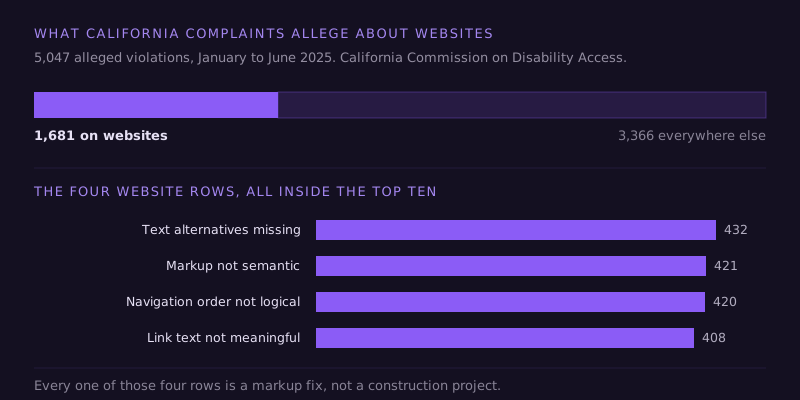
Read what those four actually are. Text alternatives missing, meaning images with no alt text. Content not marked up semantically, meaning headings and lists and tables that only look like headings and lists and tables. Navigation order that isn't logical. Link text that doesn't say where it goes. These are not exotic engineering problems. They are the first four things any competent build gets right, and they are the most-alleged web failures in the state because so many sites don't.
Worth being straight about one thing: this dataset comes from complaints that also allege physical barriers, so these web allegations often ride along with a visit to the restaurant. That does not make them cheaper to lose. It means a site inspection and a walk-through arrive in the same envelope.
The five that get restaurants specifically
1. The menu as a PDF or an image. The big one. A menu exported as a picture is invisible to a screen reader, unreadable at 200% zoom, and miserable on a phone in a parking lot. Put the menu in real HTML text on a real page. Same for daily specials posted as a photo of a chalkboard, and for hours baked into a graphic. This is also, not coincidentally, the single best thing you can do for search and for AI assistants, which cannot read your menu either. A restaurant whose menu is a picture is invisible to the thing your customer just asked for a recommendation.
2. The ordering and reservation widget. Toast, OpenTable, Resy, a delivery embed. It sits on your page and it is your problem, and it is the exact fact pattern of Robles: the claim there was about being unable to complete an order. Test it yourself. Put the mouse down, use Tab, Enter and the arrow keys, and try to get from the menu to a placed order. If you get stuck in a modal you cannot escape, so does everyone using a keyboard.
3. Food photography with no alt text. The most-alleged web violation in the state, on the content type restaurants publish more of than anyone. Describe the dish, not the file name. Decorative background shots can take an empty alt attribute, which is a real answer rather than a skipped one.
4. Contrast. Restaurant sites love thin light type over dark, moody photography. Your eyes on a bright laptop in an air-conditioned office are not the test. Measure it: 4.5:1 for body text, 3:1 for large text, and check the text sitting on top of hero images, which is where it usually fails.
5. No access information anywhere on the site. Where the accessible parking is, which entrance is level, whether the patio has a route, whether the restroom works. Publishing that is not a legal requirement in itself, it is just useful, and it heads off the phone call. It is also exactly the kind of specific local answer that gets a restaurant named when someone asks an assistant for a place their mother can get into.
The widget that promises to do this for you
It doesn't. In April 2025 the FTC finalized a $1 million order against an overlay vendor, barring the company from claiming its automated product can make any website WCAG-compliant, and from presenting paid endorsements as independent reviews.
The practical case against overlays is simpler than the legal one. A script bolted on at page load cannot know what your food photos depict, cannot restructure a PDF menu into readable text, and cannot fix an ordering flow it did not build. What it can do is get in the way of the screen readers it claims to assist: in WebAIM's 2021 survey of accessibility practitioners, 72% of respondents with disabilities rated overlays not at all or not very effective. It does not stop the lawsuits either. UsableNet's month-by-month count for 2025 of suits against companies whose sites already ran an accessibility widget adds up to 1,416. If you have one, it is not a remediation plan. It is a line item.
What to fix, in order
- Get the menu out of the PDF. Real headings, real text, real prices. Everything else on this list is smaller than this one.
- Alt text on every food photo, and empty alt on the decorative ones.
- Fix the link text. "Click here" and eleven links all reading "menu" are two of the four most-alleged failures in the state, and they are a find-and-replace afternoon.
- Check headings and structure. One h1, no levels skipped, lists marked up as lists.
- Run the contrast numbers on body text and on anything sitting over a photo.
- Keyboard-test the ordering and reservation flow, all the way to a completed order.
- Publish an accessibility page saying what you conform to and how to report a barrier. It is what the parked bill would have required, and it costs an hour.
Steps two through five are most of the CCDA's four rows, and a small site can be through all of it in a couple of days. For the rest of your site, the ADA website compliance checklist shows how to test each item yourself with a keyboard and a phone.
About the building
I am not going to pretend this article covers your exposure. The physical side, parking slope and striping, the route from the lot, counter and table heights, restrooms, is a real and separately litigated problem, and in California it is where most claims still start. That work belongs to a Certified Access Specialist, a state-certified inspector, and no web agency, this one included, is qualified to certify a ramp. If a demand letter has already arrived, that is a lawyer's call and it is not one to sit on.
What I can tell you is that the website half is the half restaurants most often ignore, it is a third of what gets alleged, and the same work pays twice. A menu in real text, images that are described, headings in sensible order and a site operable by keyboard is simultaneously the accessibility fix, the SEO fix, and the reason an AI assistant can read your menu well enough to recommend you. Accessible markup and machine-readable markup are the same markup.
If you want that half looked at, that's what we do.
Questions restaurant owners ask
Does a small restaurant's website really have to comply? The ADA has no small-business exemption, and the obligation attaches to the business rather than its size. What size changes is what a court will consider reasonable to expect of you, not whether a claim can be brought. In practice the items most often alleged, alt text, link text, headings and contrast, cost about the same to fix on a five-page site as on a fifty-page one, which is to say very little.
Which WCAG version and level should I ask a developer for? WCAG 2.1 Level AA as the floor, 2.2 Level AA if you are rebuilding. AA is the level the Justice Department's 2024 rule for state and local government websites uses (see what the ADA requires of a website), and the level both recent California bills named, AB 1757 and AB 2190. Get the target written into the contract, and ask how it will be verified, because automated tools catch only part of the problem on their own. In a UK government test, the best single tool found 41% of the barriers planted on a page.
My menu is on a third-party ordering platform. Is that their problem? The claim will name you. Whether your vendor owes you anything for it is a question about your contract with them, not about your liability to a customer. Ask the platform for their conformance documentation, in writing, and test the flow yourself with a keyboard before you accept it.
Will an accessibility widget or overlay protect me? No, and it may make things worse. The FTC's April 2025 order against an overlay vendor bars it from claiming its automated tool makes any website WCAG-compliant. Most accessibility practitioners with disabilities surveyed by WebAIM rate overlays ineffective, and UsableNet counted more than 1,400 lawsuits in 2025 against companies already running a widget. Real remediation happens in the markup.
Is there a California law that sets a website standard yet? Not as of this writing. AB 1757 died in November 2024 and AB 2190 was moved to the inactive file in May 2026. That absence is not permission: claims are brought under the ADA and the Unruh Act regardless, and they are argued against WCAG because it is the only standard anyone has to argue against.